

🔍 Read the full analysis: 10 Best 3D Printers For Colorful Prints And Daily Projects In 2027 on ThorstenMeyerAI.com

Get movie nights delivered free with Prime
- Fast, free delivery on millions of items
- Prime Video, Amazon Music and more included
- Member-only deals all year
TL;DR
ThorstenMeyerAI.com compares 10 3D printers for multicolor work and everyday projects, ranking the Bambu Lab P2S Combo first as an all-around bundle. The guide also weighs enclosed versus open-frame designs, different multicolor systems, speed and setup; it is a buyer’s guide, not an announcement of new products.
ThorstenMeyerAI.com has published a 2027 comparison of 10 3D printers for multicolor prints and everyday making, naming the Bambu Lab P2S Combo its leading general-purpose pick, as detailed in the original analysis. The guide compares enclosed and open-frame machines, filament-handling options and speed-focused models, while stressing that the best choice depends on the buyer’s materials, workspace and willingness to manage setup and waste.
The guide puts the P2S Combo first because its package combines an enclosed printer with an included automated material system, as does this comparison of 3D printers for home projects. It describes the Bambu Lab A1 Combo as a more approachable option for hobbyists, and distinguishes the standalone P1S from the P1S Combo: the former is for buyers who want an enclosed printer without bundled multicolor hardware, while the latter adds an AMS system.
The other named models take different approaches. The Snapmaker U1 uses four toolheads, while the Adventurer 5M emphasizes fast CoreXY printing. The Anycubic Kobra X, Flashforge AD5X and Bambu Lab K2 Combo are presented as additional routes into multicolor printing. The supplied material does not provide a complete model-by-model specification sheet or detailed test results for all 10 entries.
ThorstenMeyerAI.com says it compared print-system design, material handling, enclosure, setup, expected maintenance and versatility. It gave extra weight to whether multicolor hardware comes in the bundle, and ranked models for their fit with different buyers rather than treating advertised speed as the only measure. The guide cautions that a lower-ranked machine may still suit a particular project better.
The 10 picks
- 1
 Snapmaker U1 3D Printer with 4-Toolhead and 5-Second Tool ChangerView on Amazon →
- 2
 Bambu Lab P2S Combo – P2S 3D Printer with AMS 2 Pro (Multi‑Color)View on Amazon →
- 3
 Bambu Lab P1S Combo 3D Printer with AMS – Multi‑Color PrintingView on Amazon →
- 4
 Creality K2 Combo 3D Printer, Multicolor Printing, Max 600mm/s Speed, Auto Le…View on Amazon →
- 5
 Bambu Lab A1 Combo + LED Lamp Kit (with AMS Lite)View on Amazon →
- 6
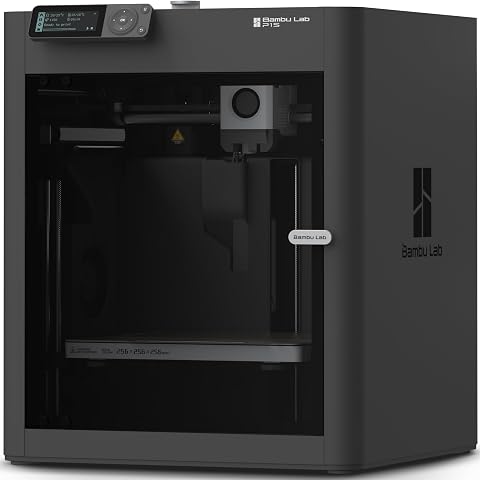 Bambu Lab P1S 3D PrinterView on Amazon →
- 7
 Anycubic Kobra X Multicolor 3D PrinterView on Amazon →
- 8
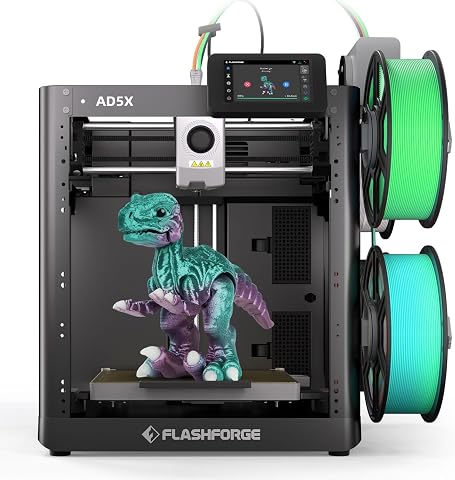 Flashforge AD5X Multi-Material 3D PrinterView on Amazon →
- 9
 Bambu Lab A1 FDM 3D PrinterView on Amazon →
- 10
 FLASHFORGE Adventurer 5M 3D Printer, All-Metal CoreXY, 600mm/s Max TravelView on Amazon →
Choosing a Printer That Fits Your Work
The comparison matters to buyers because multicolor capability changes both workflow and cost. Filament-switching systems and multiple toolheads handle material changes differently; switching can add print time and create purge waste, particularly on designs that use several colors on each layer. An included material-handling system may make a printer more convenient, but that convenience is most useful to people who will regularly print in multiple colors.
For routine functional parts, a simpler single-color machine could be a better fit than a more elaborate system. An enclosure can help control drafts and temperature for some materials, but it takes up space and may call for attention to ventilation. The guide’s central practical point is to match the printer to expected materials, project size and available workspace, not just a headline feature.
Popular right now

KitchenAid Artisan 5-Quart Tilt-Head Stand Mixer, Almond Cream

Dyson Cyclone V10 Origin Cordless Vacuum

Shark HydroVac MessMaster Wet Dry Vacuum & Mop Combo (AW261)
As an affiliate, we earn on qualifying purchases.
How the Models Differ
The guide groups the choices by tradeoff rather than treating all printers as interchangeable. The P1S and P2S Combo represent enclosed options, with the P2S package adding included multicolor material handling. The A1 models are open-frame alternatives described as more accessible for hobbyists whose materials and workspace suit that design. The Snapmaker U1’s four-toolhead approach offers a different material-change method from filament-switching systems.
It also cautions against reading maximum travel speed as a guarantee of shorter finished-print times. Geometry, layer height, material and cooling affect results, as do the motion system and desired surface finish. Build volume, machine footprint and the work between prints—such as cleaning the build surface or clearing a nozzle—also affect day-to-day ownership. The source material gives no numerical benchmarks for comparing these factors across every model.
“The P2S Combo takes the lead for buyers seeking one package that combines an enclosed printer with an included multicolor material system.”
— ThorstenMeyerAI.com
Specs and Test Results Not Provided
The supplied source material names several models and summarizes the guide’s ranking approach, but it does not list all 10 picks or provide each printer’s price, build volume, supported materials, measured print times or test conditions. It is also not clear from the material whether the rankings reflect hands-on testing, manufacturer information or another evaluation method. Readers should not treat the ranking as a controlled benchmark comparison on the basis of the details provided here.
Product bundles and specifications can vary by market and over time. The guide’s general comments about setup, maintenance, waste and material compatibility do not quantify those costs or establish that each issue affects every model equally.
Check the Full Model Comparisons
Buyers using the guide should compare the full listings against their own project needs, confirm what hardware is included in each bundle and check current specifications with the manufacturer or retailer. Before choosing, they can measure the available bench space, identify likely print materials and consider how often they will use multicolor features.
The supplied material does not announce a product release, a test schedule or a later update. Any further developments—such as changed bundles, pricing or specifications—would need to be verified against current product information.
Key Questions
Which printer does the guide rank first?
The guide ranks the Bambu Lab P2S Combo first as a general-purpose package combining an enclosed printer with an included multicolor material system.
How do the P1S and P1S Combo differ in the guide?
The standalone P1S is described as an enclosed printer without bundled multicolor hardware. The P1S Combo adds an AMS system for buyers who want that material-handling option.
Is multicolor printing the right choice for every buyer?
No. The guide says multicolor workflows can add print time and purge waste. Buyers who mostly make single-color functional parts may prefer a simpler setup.
Does the source provide measured performance results for all 10 printers?
Not in the supplied material. It describes the comparison criteria and names several models, but does not give a full specification table or numerical, model-by-model test results.
Source: ThorstenMeyerAI.com