
🔍 Read the full analysis: 8 Best Drawing Tablets For Digital Art In 2027: A Buyer’s Guide on ThorstenMeyerAI.com

Get movie nights delivered free with Prime
- Fast, free delivery on millions of items
- Prime Video, Amazon Music and more included
- Member-only deals all year
TL;DR
A buyer’s guide from ThorstenMeyerAI.com compares eight drawing tablets by setup, workspace, portability and controls. It names the HUION Kamvas 13 (Gen 3) its best overall screen-tablet pick, while noting that compatibility, included accessories and supported apps require buyers to verify before purchase.
ThorstenMeyerAI.com’s original analysis compares eight drawing tablets, recommending the HUION Kamvas 13 (Gen 3) as its best overall pick for artists who want to draw on a screen and use dial controls. The guide also compares computer-connected pen tablets with standalone devices, stressing that software support, workspace and connection needs can matter as much as advertised pen features.
The guide’s eight picks span three kinds of setup: screen tablets connected to a computer, screenless pen tablets used alongside a computer monitor, and standalone tablets for supported drawing apps. Its top overall choice, the Kamvas 13 (Gen 3), pairs an on-screen drawing surface with dual dials, but requires a compatible computer and a suitable connection, considerations also relevant to AI-powered drawing tablets. The guide does not provide a complete technical specification sheet in the supplied material.
The other named options are the HUION Inspiroy H1060P, HUION H640P, Wacom Intuos Small, two listings called XP-Pen Artist 13.3 Pro V2, Frunsi RubensTab T11 Pro and PicassoTab A10. The H1060P is presented as a value-oriented, larger pen tablet for people who already have a computer. The H640P and Intuos Small emphasize portability, while the Frunsi and PicassoTab models are described as standalone options.
The guide treats the two XP-Pen listings cautiously, saying they appear to describe closely related screen tablets. It advises shoppers to compare the exact specifications and accessories in each package rather than infer a meaningful difference from the product names alone. The source material does not establish whether the listings are identical.
The 8 picks
- 1
 HUION Kamvas 13 (Gen 3) 13.3-Inch Drawing Pen Display with Dual Dial and StandView on Amazon →
- 2
 PicassoTab 10" Standalone Drawing Tablet (A10)View on Amazon →
- 3
 XP-Pen Artist 13.3 Pro V2 Drawing Tablet with Screen, 16K Pressure Levels, Re…View on Amazon →
- 4
 XPPen Artist 13.3 Pro V2 Drawing Tablet with ScreenView on Amazon →
- 5
 Frunsi RubensTab T11 Pro Standalone Drawing TabletView on Amazon →
- 6
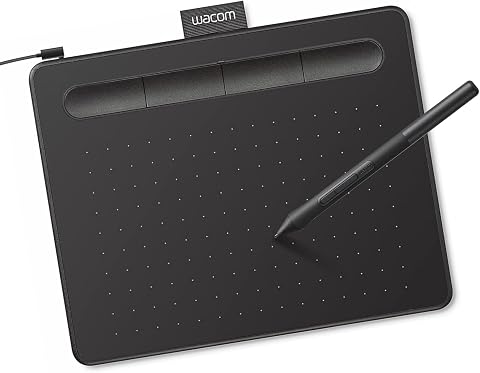 Wacom Intuos Small Wired Drawing Tablet with PenView on Amazon →
- 7
 HUION Inspiroy H1060P Graphics Drawing Tablet, 10 x 6.25 inView on Amazon →
- 8
 HUION Inspiroy H640P 6 × 4-Inch Drawing Tablet with Battery-Free StylusView on Amazon →
Choosing the Right Drawing Setup
The guide’s main point is that a tablet’s workflow and compatibility may be more consequential than a headline pen specification. A screen model lets artists draw where they see the image; a pen tablet separates the drawing surface from the computer display; and a standalone device can reduce reliance on a computer for supported tasks. Each arrangement involves tradeoffs in cost, portability and software choice.
That distinction matters for both new and experienced artists. A compact tablet may suit a small desk or travel but restrict broad hand movements, while a larger surface takes up more room. A standalone model may simplify carrying a setup, but buyers still need to check whether their preferred apps and working methods are supported. The guide frames its ranking as a comparison of different needs, not proof that one product is best for every artist.
Popular right now

Sony 65 Inch BRAVIA 5 Mini LED 4K HDR Smart Google TV (K-65XR50)

Ninja CREAMi Scoop & Swirl 13-in-1 Ice Cream and Soft Serve Maker, NC701

Vitamix Nano Personal Blender with SmoothiePilot, Black
As an affiliate, we earn on qualifying purchases.
How the Eight Picks Differ
The source says the rankings were based on setup type, usable workspace, portability, controls and stated pen features, as well as the likely learning curve. Screen tablets were considered for artists who want direct drawing on the image, pen tablets for people comfortable working at a computer, and standalone devices for buyers seeking fewer cables. The guide says it prioritized practical fit over treating higher specifications as automatic advantages.
Its comparison also highlights checks to make before ordering: confirm the exact operating-system and app support, determine what connection a screen tablet needs, and check the active drawing area rather than relying on the device’s overall dimensions. For standalone models, buyers are advised to confirm that the desired creative apps are available. The supplied source gives no prices, test measurements or detailed release history for the eight products.
“The main tradeoff is between drawing directly on a display, using a more affordable pen tablet with a separate computer screen, or paying for a self-contained tablet.”
— ThorstenMeyerAI.com buyer’s guide
Details Shoppers Must Verify
The source material does not include prices, current stock, hands-on test results, detailed specifications or a publication date. It also does not identify the exact configurations or packages behind the two XP-Pen listings, so their differences cannot be confirmed from the guide excerpt alone. Claims about relative value are recommendations from the guide, not independently documented price comparisons here.
Compatibility may vary by computer, operating system, drawing app, driver and connection. The guide does not list verified support combinations for each product or specify which apps are available on the standalone models. Buyers should check the manufacturer’s current product and support information before making a purchase.
Check Models Before Buying
The next step for shoppers is to narrow the choice by setup: decide whether they want a display, a screenless tablet paired with a computer, or standalone use. Then check the exact model, connection requirements, supported apps and package contents against their own devices and workflow. For the XP-Pen listings, comparing full specifications and included accessories is particularly relevant.
The guide provides no announced follow-up review or product update. Prices, availability and software compatibility may change, so those details remain matters for buyers to confirm from current retailer and manufacturer listings.
Key Questions
Which drawing tablet does the guide rank first?
The guide names the HUION Kamvas 13 (Gen 3) its best overall pick, particularly for artists seeking an on-screen drawing surface and dial controls. It still needs a compatible computer and suitable connection.
Which pick is aimed at buyers seeking a larger pen-tablet workspace?
The HUION Inspiroy H1060P is presented as a value option with a larger screenless drawing area than the H640P and Wacom Intuos Small. It is intended for use with a computer.
Are the two XP-Pen Artist 13.3 Pro V2 listings different?
The supplied guide says they appear closely related but does not confirm whether they are identical. It recommends checking the exact specifications and included accessories for each listing.
What should buyers check before ordering a tablet?
Confirm compatibility with the computer or mobile device, operating system and drawing apps. Also check the connection requirements, active work area, portability and, for standalone models, whether the preferred apps are supported.
Source: ThorstenMeyerAI.com