
📊 Full opportunity report: One markdown file, publish-ready for every platform on IdeaNavigator AI — validation score, market gap, and execution plan.

Get movie-night favorites delivered free — and shop member deals
- Fast, free delivery on millions of items
- Access to Prime Big Deal Days deals on October 6–7
- Prime Video, Amazon Music and more included
TL;DR
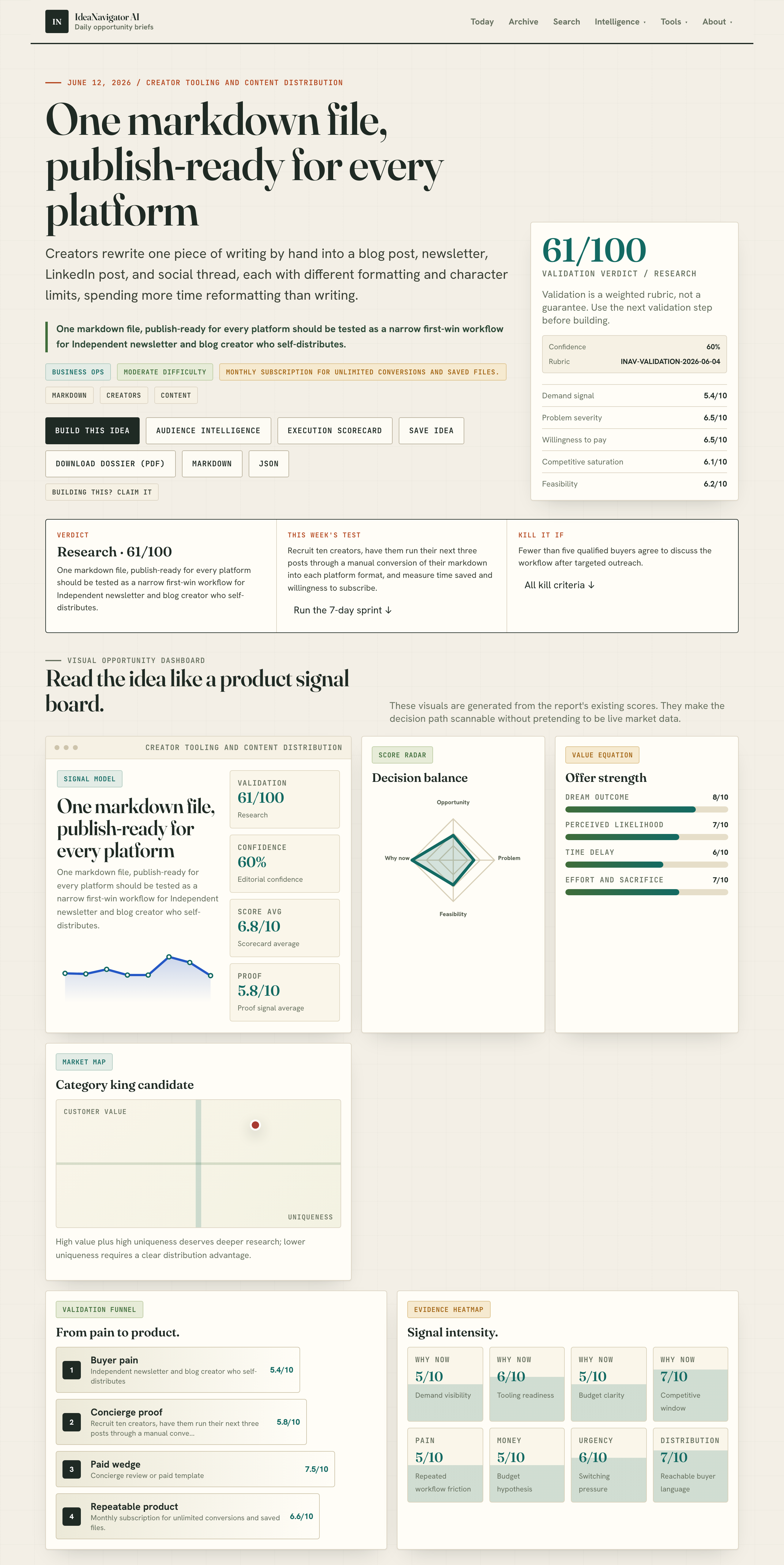
A web-based tool now enables creators to upload one markdown file and instantly generate platform-specific formats, saving time on manual reformatting. This development targets independent creators who publish across multiple channels.
A new web tool has been introduced that allows creators to upload a single markdown file and receive instant, ready-to-publish formats for blogs, newsletters, and social media platforms. This development addresses the manual reformatting burden faced by independent content creators, potentially saving significant time and effort.
The tool, developed for independent newsletter and blog creators, accepts one markdown file and outputs three formats: an HTML version optimized for blogs, a plain-text version suitable for newsletters, and a character-limited version for platforms like LinkedIn, all while preserving heading hierarchy and formatting.
According to IdeaNavigator AI, the MVP aims to streamline content distribution by reducing the need for manual reformatting across multiple platforms. The service plans to operate on a subscription model offering unlimited conversions and saved files, targeting the creator tooling market.
The concept is currently being validated through a pilot involving ten creators, who will test the tool by converting their upcoming posts and providing feedback on time savings and willingness to subscribe.
Impact on Independent Content Creators
This tool could significantly reduce the time creators spend on formatting, allowing them to focus more on content creation rather than technical adjustments. It addresses a key pain point caused by the fragmentation of the creator economy, where content must be tailored for multiple platforms with different formatting requirements.
By simplifying multi-platform publishing, the tool may also lower barriers for new creators and enhance content consistency across channels, potentially increasing engagement and reach.
As an affiliate, we earn on qualifying purchases.
Growing Need for Cross-Platform Content Tools
The creator economy has expanded rapidly, with independent creators often managing multiple channels such as blogs, newsletters, LinkedIn, and social media threads. Each platform has distinct formatting rules and character limits, leading to increased manual work for creators who must reformat content for each outlet.
Currently, most creators rely on manual copy-and-paste or custom scripts, which are time-consuming and prone to errors. The idea of a single markdown file serving as a source for all formats is seen as a potential game-changer in simplifying this workflow.
This initiative aligns with broader trends toward automation and tooling improvements in the creator economy, aiming to make content distribution more efficient and scalable.
“This tool could dramatically cut down the time creators spend on formatting, making multi-platform publishing more feasible for solo creators.”
— an anonymous researcher
content formatting tools for creators
As an affiliate, we earn on qualifying purchases.
As an affiliate, we earn on qualifying purchases.
Uncertainties About Adoption and Effectiveness
It is not yet clear how widely the tool will be adopted by creators or how effectively it will handle complex formatting scenarios. The validation process with the initial ten creators is ongoing, and user feedback will determine its future improvements.
Details about pricing, long-term sustainability, and integration with existing content management workflows remain to be clarified as the product develops.
social media post formatting software
As an affiliate, we earn on qualifying purchases.
As an affiliate, we earn on qualifying purchases.
Next Steps for Deployment and Validation
The next phase involves collecting feedback from the pilot group of creators, refining the tool based on their experiences, and expanding outreach. If successful, the developers plan to launch publicly with marketing targeted at independent content creators and small media teams.
Further updates are expected as user data and feedback inform future features, including potential integrations with popular publishing platforms and automation tools.
As an affiliate, we earn on qualifying purchases.
Key Questions
How does the tool handle complex formatting or multimedia elements?
Currently, the tool focuses on text formatting and heading hierarchy. Handling multimedia or complex layouts is not yet supported and remains a future development area.
Is there a free version or trial available?
Details about free trials or tiered pricing are not yet confirmed. The initial offering will likely be a subscription model with unlimited conversions for subscribers.
Can the tool integrate with existing content management systems?
At this stage, the tool is a web-based converter without direct integrations. Future plans may include API access or plugin options for popular CMS platforms.
Will the tool support other formats beyond markdown?
Currently, the focus is on markdown as the source format. Support for other formats may be considered based on user demand.
When will the tool be generally available?
A public launch date has not been announced. The current phase involves pilot testing and refinement before a wider release.
Source: IdeaNavigator AI
Fall Picks
fall essentials
As an affiliate, we earn on qualifying purchases.